Is CTRTool Built for Mimicking Human Searching? A Guide
You set a keyword, pick a device, and wonder whether automated visits look anything like a real person searching. Search engines score behavior, so a campaign that clicks without a plausible path or dwell time may not move the needle.
This guide answers whether CTRTool is actually built to mimic human searching, and where its claims stop. By the end you will know how Desktop and Mobile campaigns replicate search behavior, what the platform controls versus what it openly disclaims, and whether its features and pricing fit your campaign.
What Is CTRTool? Who It's Built For and What It Does
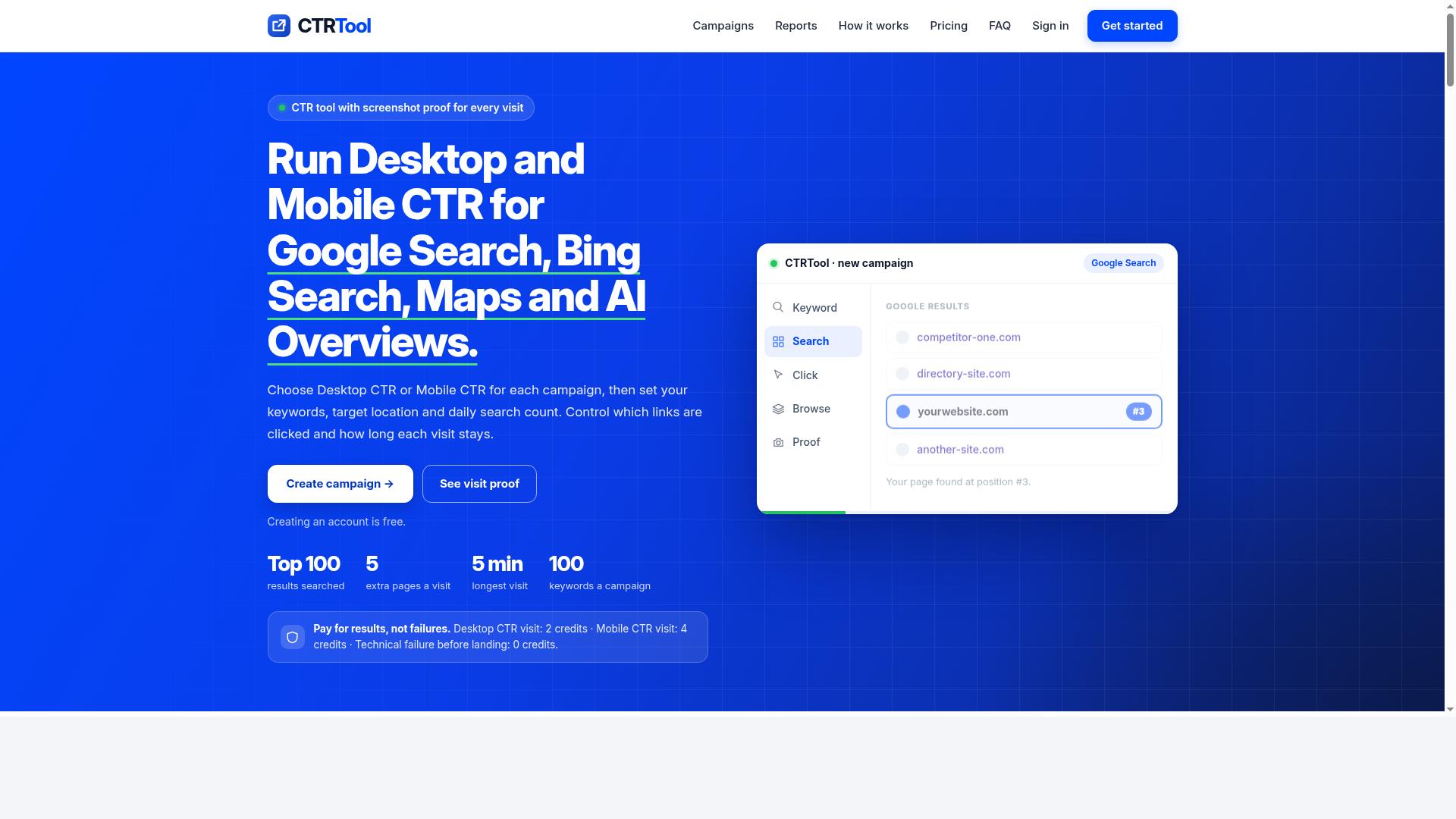
CTRTool is a SaaS platform that runs click-through-rate (CTR) campaigns for Google Search, Bing Search, Google Maps, and AI Overviews, using simulated human searches to influence keyword rankings. It is built for SEO practitioners and agencies who want to improve organic visibility by simulating real user clicks on search results.
The platform's positioning is simple and specific: it is a CTR tool with screenshot proof for every visit. That proof matters, because it lets users see exactly what happened during a campaign rather than trusting a black box. Reports include full visit paths, search and website screenshots, and keyword positions over time.
CTRTool is not a traffic bot or a generic automation tool. It is a specialized platform for search behavior simulation, focused on the surfaces where organic visibility actually matters. Campaigns are delivered through Desktop Chrome windows and real Android phone sessions, matched to the target location through managed proxy routes. The service is available globally.
The brand is also upfront about limits. Its own site states that automated visits do not guarantee rankings, which sets realistic expectations for anyone considering a CTR campaign. For SEO teams weighing whether the tool mimics human searching, that combination of platform-specific campaigns, documented visits, and honest framing is the core of the answer.
Campaign Types: Google Search, Bing Search, Maps and AI Overviews
CTRTool supports four distinct campaign types: Google Search CTR, Bing Search CTR, Google Maps CTR, and AI Overview CTR, each targeting a different surface where organic visibility matters. Users choose Desktop or Mobile per campaign, set keywords and location targeting, and define how each visit behaves.
For Google Search CTR, the campaign searches your keyword and clicks the organic result. You can target the top 100 results, direct visits to internal pages, and set link text, click order, and scrolling time. Bing Search CTR follows the same mechanics on Bing.
Google Maps CTR campaigns find a business listing and click its website link, with up to 50 listings checked and city-level targeting. AI Overview CTR requires a matching query and citation: the campaign finds your website in the overview and clicks its source link, with citation order tracked in reports.
Location targeting spans country, state, and city, or Any country, and a single campaign supports up to 100 keywords. Daily search counts can run immediately, spread out, or with gaps, across chosen days, hours, and time zone, with daily goals resetting at 00:00 UTC. Visits can last up to five minutes in total and cover up to five additional pages, which helps sessions resemble natural browsing rather than a single quick click.
Every campaign is designed around human searching patterns on its platform: a typed query, a deliberate click, a realistic dwell time, and follow-up page views. Combined with per-visit screenshots, this is what separates search behavior simulation from raw bot traffic.
Is CTRTool Built for Mimicking Human Searching? The Direct Answer
Yes, CTRTool is explicitly built to mimic human searching behavior, but it does so through controlled, proof-backed campaigns rather than uncontrolled bot traffic. The platform is positioned as a CTR tool with screenshot proof for every visit across Google Search, Bing Search, Maps and AI Overviews. That framing matters because it tells you exactly what kind of tool this is.
CTRTool focuses on replicating realistic search sessions. Users define the device, the location and the keyword, and the system carries out a search and a click on the chosen result. Each interaction is recorded, so the activity is measurable and auditable rather than hidden.
This is the key contrast with black-hat bots. Those tools work by obscurity: rotating proxies, spoofed fingerprints and hidden activity that the operator cannot inspect. CTRTool takes the opposite stance. It shows you search and landing screenshots as separate proof images, along with full visit paths, so every campaign can be reviewed after the fact.
What CTRTool does not do is claim to bypass anti-bot systems or guarantee rankings. It is a transparency-first tool for teams who want to influence click-through rate and observe keyword positions over time, including Maps listing order and AI citation order. The emphasis is on proof and control, not stealth.
How Desktop and Mobile CTR Campaigns Replicate Real Search Behavior
Desktop and Mobile CTR campaigns in CTRTool replicate real search behavior by letting users choose the device type, target country/state/city, and keyword, then simulating a search and click on the specified result. The controls are deliberately simple and user-facing.
Here is the flow a campaign follows:
- Choose the device per campaign, either Desktop or Mobile, so the session matches how real searchers would arrive.
- Set the location to a specific country with an optional state and city, or select "Any country" to use a mix of supported locations.
- Enter the keyword and the target result, and the system performs the search and clicks that result.
- Review the proof, since each visit is recorded with screenshots showing that the interaction occurred.
Location targeting is where the realism becomes practical. A campaign for a local business can be pointed at a single city, while broader campaigns can spread interactions across a mix of supported locations. That flexibility helps campaigns reflect genuine search query patterns rather than one repeated signature.
Visits can last up to 5 minutes and include up to 5 additional internal pages, which gives a session more of the shape of a real visit rather than a single bounce. All of this is visible to the campaign owner through the proof screenshots and full visit paths.
What CTRTool Controls - and What It Doesn't Claim
CTRTool gives users control over campaign parameters like device type, location, keyword, and target URL, but it does not claim to guarantee ranking improvements or bypass search engine policies. Setting those expectations clearly is part of how the tool is presented.
On the control side, users manage:
- Device type, choosing Desktop or Mobile for each campaign.
- Location targeting, from a specific country, state and city to "Any country" for a mix of supported locations.
- Campaign scale, with up to 100 campaigns holding 100 keywords each.
- Duration and credit usage, under a pay-for-results model where no credits are charged for technical failures before landing, and visits that cannot verify the requested location use no credits.
- One shared credit balance across all campaign types, websites and keywords, with unused credits rolling over while subscribed.
What CTRTool does not claim is equally important. There is no promise of guaranteed ranking lifts, no anti-bot bypass, and no click fraud. The tool provides screenshot proof and tracks keyword positions over time, but the user remains responsible for complying with search engine guidelines. The site itself advises starting with tier links, PBNs and test properties, and using CTR on main sites with caution.
That honesty is the point. CTRTool is a legitimate, transparent platform for search behavior simulation with auditable results, not a stealth service. Used within its stated scope, it gives SEO teams a measurable way to work on click-through rate and organic traffic signals while keeping every interaction documented.
Key Features Behind the Human-Search Simulation
CTRTool's human-search simulation is backed by features that provide visibility into each campaign: screenshot proof, full visit paths, and position tracking across search and AI surfaces. These are not marketing labels. They are verifiable artifacts a user can inspect after a visit has occurred.
That distinction matters in a market where bot traffic is often sold on trust alone. Many services describe automated browsing in broad terms, then leave the buyer with a dashboard number and no way to confirm what actually happened on the SERP. CTRTool takes the opposite approach: every visit leaves evidence behind, and the evidence is accessible to the account holder.
The core features fall into three groups:
- Screenshot proof for each visit, split into search and landing images
- Full visit paths showing the sequence of actions with timestamps
- Keyword position tracking across Google Search, Bing Search, Maps listing order, and AI citation order
Together, these features support the claim of human-like search behavior simulation with data rather than assurances. The sections below break down each one and explain what it actually shows you.
Screenshot Proof and Full Visit Paths for Every Visit
Every CTRTool visit generates two separate proof images: a search screenshot showing the query and result, and a landing screenshot showing the destination page, along with a full visit path. Keeping the two images separate is a deliberate design choice. It lets you confirm both halves of the interaction, the SERP moment where the click happened and the page state after arrival.
The search screenshot captures the query as entered and the result that was clicked. The landing screenshot captures the destination page once it loaded. Together they answer the question most buyers of automated traffic cannot answer: did the visit actually occur, and did it land where it was supposed to?
The full visit path adds context around those images. It records the sequence of actions and timestamps, so you can see how the session unfolded rather than just its endpoints. Visits can run up to 5 minutes and include up to 5 additional internal pages, which gives the path room to reflect a realistic browsing session rather than a single bounce.
This transparency is a core differentiator against opaque bot traffic. With most automated browsing services, a user agent rotation and a proxy network are invisible to the buyer, and there is no artifact to audit. CTRTool's proof images and visit paths turn that black box into something you can review directly. For anyone evaluating click-through rate campaigns, that audit trail is often the deciding factor.
Keyword Position Tracking, Maps Order and AI Citation Order
CTRTool tracks keyword positions over time for Google Search and Bing Search, and also monitors Maps listing order and AI citation order to show how campaigns affect visibility across surfaces. Tracking is built into each campaign, so position changes for the target keyword are visible alongside the visit activity that may have influenced them.
For Maps campaigns, the tool records the order of the business listing among up to 50 results. For AI Overview campaigns, it tracks citation order. These are meaningful signals because local and AI-driven surfaces now sit alongside classic organic results in how people find businesses, and a ranking change on one surface does not always mirror another.
Two points are worth stating plainly:
- This tracking is observational. It shows what changed over time, not a controlled experiment.
- It is not a guarantee of ranking improvement. Position data helps you assess campaign impact, but no responsible tool can promise a specific ranking outcome.
Used correctly, the data supports better decisions. You can compare position movement against visit volume, pause campaigns that are not moving the needle, and focus budget on keywords where the trend is favorable. The same principle applies to impression share and click-through rate reporting: the value lies in the pattern over time, not a single snapshot.
Pricing and Plans
CTRTool offers monthly plans priced in USD: Starter at $59/month for 2,000 credits (up to 1,000 Desktop CTR visits or 500 Mobile CTR visits) and Growth at $125/month for 5,000 credits (up to 2,500 Desktop or 1,250 Mobile visits). Both tiers cover every campaign type, so the plan you pick depends on volume, not on which kind of search behavior simulation you want to run.
The credit model is straightforward and worth understanding before you choose a tier. A Desktop CTR visit costs 2 credits, while a Mobile CTR visit costs 4 credits. That difference explains why the same credit pool supports fewer mobile sessions: mobile visits carry more weight in the system.
| Plan | Monthly Price | Credits | Desktop Visits | Mobile Visits |
|---|---|---|---|---|
| Starter | $59 | 2,000 | Up to 1,000 | Up to 500 |
| Growth (Recommended) | $125 | 5,000 | Up to 2,500 | Up to 1,250 |
| Scale | $399 | 20,000 | Up to 10,000 | Up to 5,000 |
| Agency | $699 | 40,000 | Up to 20,000 | Up to 10,000 |
Two larger tiers sit above Growth for heavier workloads. Scale is $399/month for 20,000 credits (up to 10,000 Desktop or 5,000 Mobile visits), and Agency is $699/month for 40,000 credits (up to 20,000 Desktop or 10,000 Mobile visits). Growth carries a Recommended label on the site, which makes sense for users who want room to mix desktop and mobile campaigns without jumping to an agency-sized budget.
The credit system also has a few practical rules that affect real-world cost. A verified search without a match costs 1 credit, and a technical failure before landing costs nothing, so you are not charged for sessions that never reach your page. Unused credits roll over while your subscription stays active and expire when a cancellation takes effect. Creating an account is free, and custom development carries a separate one-time fee agreed in advance.
Pricing is transparent on the site, with no hidden fees layered on top of the listed monthly rates. One detail worth noting: the page shows limited launch pricing with a notice that prices rise 30% on November 15. If you are weighing a plan, the current rates are the ones displayed at checkout, and everything above is visible before you commit to anything.
Trust Signals: Proof, Transparency and the Credit Model
CTRTool builds trust through verifiable proof: every visit is documented with screenshots, and the credit model ensures users pay only for completed visits. That combination matters in a space where bot traffic and vague promises are common. Instead of asking users to take results on faith, the platform shows its work.
The screenshot record turns each visit into something you can inspect rather than assume. Users can review full visit paths, seeing how a session moved through the SERP and the landing page. This is the difference between a claim and evidence.
The credit-based billing follows the same logic. Cost tracks delivered visits, so credits are tied to work that actually happened. For anyone weighing CTR manipulation services, that alignment is a meaningful signal.
CTRTool also provides position tracking data, so users can see outcomes tied to their keyword ranking over time. This keeps the focus on measurable movement rather than promises.
Equally important is what CTRTool does not claim. It does not claim to bypass anti-bot detection systems, and it does not guarantee rankings. Those limits set realistic expectations and keep the tool honest about its role in a broader search engine optimization effort.
Transparency extends to the legal side. A dedicated legal notices page at ctrtool.com/licenses.html lays out the terms in plain view. Combined with screenshot proof, visit paths, credit billing, and position data, CTRTool gives users a clear, checkable picture of what they are paying for.
Who Should Use CTRTool
CTRTool is designed for SEO practitioners and agencies running CTR campaigns for their own or client websites across Google Search, Bing Search, Google Maps, and AI Overviews. It is a working tool for people who already understand how search results behave and want to shape click-through rate outcomes deliberately.
The core audience is SEO professionals, agencies, and in-house marketers who treat organic CTR as a lever they can influence, not just a metric they report on. These users typically manage multiple properties and need repeatable campaign structures rather than one-off experiments.
Common use cases include:
- Improving rankings for specific keywords by targeting click-through rate on chosen queries
- Testing how SERP features respond when interaction patterns change
- Supporting local SEO through Google Maps campaigns
- Running campaigns across Google Search, Bing Search, and AI Overviews from one workflow
Each of these tasks sits close to search behavior simulation. That means the user needs to think about search query patterns, session duration, and how SERP interaction differs between engines and between standard results and Maps listings.
The site's own guidance references tier links, PBNs, and test properties. That is a strong signal about the intended user: someone who already knows how tiered link structures and private blog networks work, and who understands why a test property is useful before touching a client site. A newcomer reading those terms would likely be lost.
So the honest answer on audience is narrow. CTRTool suits practitioners who can plan a campaign, interpret the results, and adjust. It is not built for beginners, and it does not promise guaranteed rankings. Anyone looking for a push-button path to page one should look elsewhere, because CTR manipulation is a testing discipline, not a certainty.
For the right user, the fit is clear. Agencies and in-house teams that already run search engine optimization programs can add CTRTool to their toolkit as a focused way to work on organic click-through rate, with the advanced references acting as a filter that keeps the tool in experienced hands.
Final Verdict: Is CTRTool the Right Fit for Your CTR Campaigns?
CTRTool is a fit for SEO practitioners and agencies who value proof-backed CTR campaigns and are comfortable with a credit-based model, but it is not a magic bullet for rankings. The platform is built around auditable campaigns, not guaranteed outcomes, and that distinction matters when you decide whether to bring it into your workflow.
For teams tired of guessing whether a CTR campaign actually ran, the screenshot proof is the headline strength. It lets you verify that SERP interaction happened as configured, which supports the kind of accountability that CTR manipulation projects often lack.
The core strengths of CTRTool line up with what serious campaign managers ask for:
- Screenshot proof for each campaign, so results can be reviewed rather than assumed.
- Multiple campaign types, giving you room to match the approach to your keyword set and goals.
- Location targeting, useful when search behavior simulation needs to reflect a specific market.
- Transparent pricing through a credit-based model, so spend maps to campaign volume.
These features support a structured approach to search behavior simulation without pretending the tool controls the algorithm.
Limitations deserve equal weight. CTRTool does not guarantee ranking improvements, and any tool claiming otherwise should raise suspicion. Campaigns also require a keyword to already sit within the top 100 rankings, so this is not a rescue tool for pages that are nowhere near the indexable results.
It is also not designed for people seeking anti-bot stealth. If your interest is in proxy networks, user agent rotation, fingerprint spoofing, or CAPTCHA bypass, CTRTool is not positioned as that kind of product. It serves campaign managers, not stealth operators.
Balanced against those points, the verdict is straightforward. CTRTool suits users who need auditable CTR campaigns and are willing to test, measure, and adjust. It rewards a methodical approach to improving click-through rate and organic traffic signals.
It is less suited to anyone expecting instant ranking jumps or looking for a tool built around evading anti-bot detection. Set realistic expectations around search query patterns and session behavior, and the platform fits neatly into an SEO testing routine.
For support or questions, contact vaibhav@autoblogging.ai. The site also lists Support, Terms of use, and Legal notices pages for reference.
Frequently Asked Questions
What does "mimicking human searching" actually mean in CTRTool?
CTRTool runs CTR campaigns that perform real searches for your chosen keywords and click your organic result, rather than sending traffic directly to a URL. Each campaign follows a full visit path, and you get screenshot proof of both the search and the landing page for every visit. This makes the activity resemble how a genuine searcher finds and opens your page.
Can I choose between desktop and mobile searches for each campaign?
Yes. When setting up a campaign you choose Desktop CTR or Mobile CTR, so the visit type matches the device you want to emulate. This applies across Google Search, Bing Search, Maps and AI Overviews campaigns. You can run separate campaigns for each device type if you want to cover both.
How does CTRTool make sure my page can actually be found and clicked?
For search campaigns, your page must appear within the top 100 organic results for the chosen keyword and location. Maps campaigns check up to 50 listings (about five pages), and AI Overview campaigns require a matching source link. Meeting these conditions is what allows the tool to locate and click your result during a visit.
Can I target a specific country, state or city?
Yes. You set the target location per campaign, including a chosen country and optionally a state and city. You can also select "Any country" to use a mix of supported locations. CTRTool is a global online service with no stated country restrictions.
What proof do I get that each visit actually happened?
Every visit comes with screenshot proof, with the search screenshot and landing screenshot provided as separate proof images. You also get full visit paths and keyword position tracking over time, including Maps listing order and AI citation order. This lets you verify results rather than relying on traffic numbers alone.
How does pricing work, and what does a credit cover?
CTRTool uses monthly plans priced in USD with pay-for-results credits: Starter is $59/month for 2,000 credits, and Growth is $125/month for 5,000 credits. Credits convert to visits, for example up to 1,000 Desktop CTR visits or 500 Mobile CTR visits on Starter. For questions about your specific plan, contact support at vaibhav@autoblogging.ai.